which country user step here?

Tag Cloud

MOSS (47) SharePoint 2007 (37) SharePoint 2013 (31) SharePoint 2010 (23) MOSS admin (17) PowerShell (17) admin (17) developer (16) List (15) WSS (14) sql query (14) MOSS SP2 (13) end user (11) scripting (11) wss V3 (11) permission (10) sql (9) Moss issue (8) search (8) database (7) RBS (6) Service Pack (6) reportadmin (6) workflow (6) CU (5) Excel (5) Patch (5) client object model (5) Client Code (4) Command (4) Cumulative Updates (4) IIS (4) SharePoint 2019 (4) SharePoint designer (4) office 365 (4) stsadm (4) user porfile (4) ASP.NET (3) Content Database (3) Groove (3) Host Named Site Collections (HNSC) (3) SharePoint 2016 (3) Tutorial (3) alert (3) authentication (3) batch file (3) codeplex (3) domain (3) error (3) incomming email (3) issue (3) restore (3) upload (3) Caching (2) DocAve 6 (2) Folder (2) Index (2) Internet (2) My Site Cleanup Job (2) My Sites (2) News (2) People Picker (2) Share Document (2) SharePoint admin (2) View (2) Web Development with ASP.NET (2) add user (2) audit (2) coding (2) column (2) deploy solution (2) download (2) enumsites (2) exam (2) export (2) june CU (2) load balance (2) mySites (2) network (2) orphan site (2) performance (2) profile (2) project server (2) query (2) security (2) server admin (2) theme (2) timer job (2) training (2) web master (2) web.config (2) wsp (2) 70-346 (1) 70-630 (1) AAM (1) Anonymous (1) Approval (1) AvePoint (1) Cerificate (1) Consultants (1) Content Deployment (1) Content Type (1) DOS (1) Document Library (1) Drive Sapce (1) Excel Services (1) Export to Excel (1) Feature (1) GAC (1) Get-SPContentDatabase (1) Get-WmiObject (1) HTML calculated column (1) ISA2006 (1) IT Knowledge (1) ITIL (1) Install (1) Link (1) MCTS (1) Macro (1) Masking (1) Migration (1) NLBS (1) Nintex (1) Office (1) Open with Explorer (1) ROIScan.vbs (1) Reporting Services (1) SPDisposeCheck.exe (1) SQL Instance name (1) SSRS (1) Sandbox (1) SharePoint Online (1) SharePoint farm (1) Shared Services Administration (1) Site Collection Owner (1) Site template (1) Skype for business (1) Steelhead (1) Teams (1) URLSCAN (1) VLOOKUP (1) WSS SP2 (1) XCOPY (1) abnormal incident (1) admi (1) app (1) application pool (1) aspx (1) availabilty (1) backup (1) binding (1) blob (1) branding sharepoint (1) cache (1) calendar (1) change password (1) connection (1) copy file (1) counter (1) crawl (1) custom list (1) domain security group (1) event (1) excel 2013 (1) facebook (1) filter (1) fun (1) group (1) iis log (1) import (1) import list (1) improment (1) interview (1) keberos (1) licensing (1) log in (1) metada (1) migrate (1) mossrap (1) notepad++ (1) onedrive for business (1) operation (1) owa (1) process (1) publishing feature (1) resource (1) send email (1) size (1) sps2003 (1) sql201 (1) sql2012 (1) sub sites (1) system (1) table (1) task list (1) today date (1) trial (1) vbs (1) video (1) web part (1) web server (1) widget (1) windows 2008 (1) windows 2012 R2 (1) windows Azura (1) windows account (1) windows2012 (1) wmi (1)
Showing posts with label audit. Show all posts

Tuesday, October 8, 2019

How to read the SharePoint Security Audit Report

User request to check who's remove the permission !!!   As a SharePoint Admin we can get the information from the audit report ( anyway need to enable it before else will not have data available)

Site Settings > Audit log Reports : Select the Security settings

Once you get the report , we can get the information from the report .

Information below from the column good enough to find out who change the permission


User ID : Person done the change

Event Data : what permission is change (but is in number , so the number is represent the role showed as following )


Full Control 1073741829
Contribute 1073741827
Read 1073741826


This id is given by SharePoint , you can get it by do some programming or script.

  1. Go to the sites with /_layouts/15/people.aspx?MembershipGroupId=0
  2. You will see all the user over here, mouse over the id then you can see the left hand side bottom have the full URL detail showed . you can see the id here.
This information is showed what change is going on

Friday, June 10, 2016

About IM-8 Auditing ~ SSL RC4 Cipher Suites Supported

Recently we have some security audit is failed , so we need to fix something to pass the audit.  small part of the IM-8 we need to fix about the .

  SSL RC4 Cipher Suites Supported

 SSL Version 2 and 3 Protocol Detection


after ask around then found out need to change the server registry key to disable some other the RC4 , SSL V2 and V3 setting.

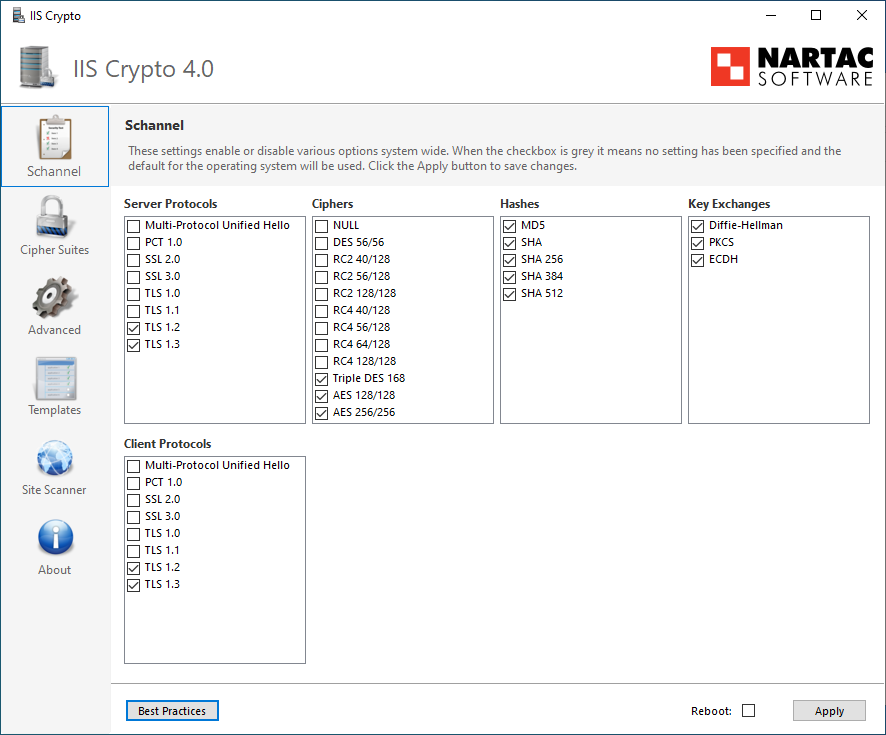
To make the task simple we have some simple tools for it :

first we need the scan tools , which is Nmap tools, you can download from internet.

after install and run following script :

nmap --script ssl-enum-ciphers 172.xx..yy.zz   -p 443

you will get the results look as following , as you see the SSlv3 is enable. 


Dowload NARTAC Software here : https://www.nartac.com/Products/IISCrypto/Download

After install then you can choice the setting you want , click Apply then Restart . Done.